Mac mini M6: tiny, silent and built for AI. Which one should you buy?
Published 24 October 2026 · prices below are checked every week
Same tiny box, a much bigger brain. We went through the most-watched YouTube reviews and the big tech sites’ tests, so you don’t have to. Here is what is exciting about the new Mac mini, what isn’t, and which one to buy.
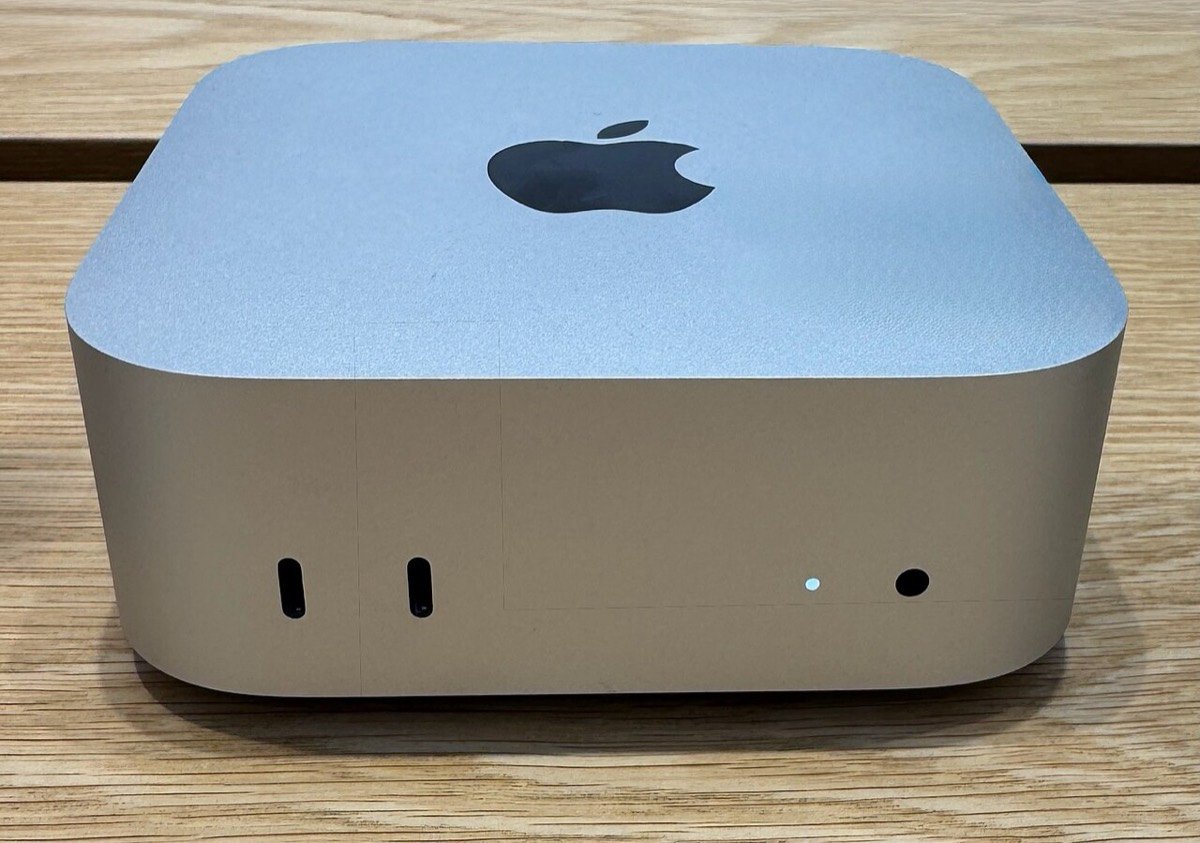
- From £899
- 12.7 × 12.7 × 5 cm
- 0.67 kg
- Wi-Fi 7
- Up to 3 screens
Why everyone’s talking about it
faster at AI than the M4 Mac mini
Apple’s own figureAI cores in a dual Neural Engine, a design that used to need Apple’s biggest chips
Apple, Geoff Fagienwhen idle. Left on all year, about £6 of electricity
Notebookcheck, Ofgem capwhen idle, measured 15 cm away. You won’t hear it.
NotebookcheckUnder the same 12.7 cm box: 12 processor cores and 12 graphics cores (up from 10 and 10), an AI accelerator inside every graphics core, storage that reads and writes at close to 7 GB a second, plus Wi-Fi 7, Bluetooth 6 and 2.5 Gb Ethernet as standard.
The AI built into the chip
The M6 doesn’t just run AI apps. It has parts made only for AI:
A Neural Engine, twice over
Two 16-core engines handle everyday AI: Apple’s own AI features, live captions, and finding faces and text in your photos. They do it fast, on very little power.
An AI booster in every graphics core
Each of the 12 graphics cores has its own Neural Accelerator for heavy AI: language models in apps such as Ollama and LM Studio, and image generators. In Apple’s tests, AI models took in a question up to 4.8× faster than on the M4, so answers start much sooner.
What you notice: AI on the Mac answers faster, transcripts and AI images are made on the computer itself, and your files stay on it.
What the reviewers threw at it
Everything at once
The Tech Chap played back a demanding 4K edit, rendered a 3D scene and generated AI images at the same time, on a model with only a little more memory than the base one. It kept up.
His surprise: the £899 M6 came close to last year’s far dearer M4 Pro. It was 24% faster on a single core and much faster in his AI tests; the M4 Pro is still about 16% ahead with every core busy.
AI on the desk, 11× quicker
Gizmodo gave a local AI model (Gemma 4 26B, running in Ollama) a coding job. The M6 with 24 GB finished in 1 min 30 s. An M4 with 16 GB took 16 min 30 s; the extra memory helped too.
A bigger 27B model was too much for it, so memory still sets the limit.
4K video, two minutes sooner
Tom’s Guide turned a 25 GB 4K video into 1080p in 2 min 45 s, nearly two minutes faster than the M4 Mac mini, and gave it an Editor’s Choice award.
Games, and still cool
Notebookcheck measured Baldur’s Gate 3 at 58 frames a second and Cyberpunk 2077 at 37.5, both at 1080p on the highest settings. Even flat out it peaked at 41.7 dB, quieter than the M4 (45.1 dB), and stayed cool.
What people really buy it for
An AI helper that never switches off
AI agents such as OpenClaw, Claude Code or Codex do jobs for you: sort email, watch prices, research overnight, run scheduled tasks. A Mac mini suits them because nobody closes its lid, unplugs it or restarts it mid-job. It becomes part of the house, like the router.
Honest bit: if the agent’s brain is ChatGPT or Claude online, the Mac only runs the tools, so even the 16 GB model is plenty.
Get: M6, 16 GB, 512 GB
Private AI on your desk
Free apps such as Ollama and LM Studio run AI models on the Mac itself. Your contracts, accounts and customers’ details never leave the room, there is no fee per question, and it works offline.
Here memory is everything: the model has to fit inside it.
Get: M6, 32 GB, or M5 Pro, 64 GB
Photo, video and music
Final Cut Pro, DaVinci Resolve, Premiere Pro, Lightroom and Logic Pro all fly. Keep big projects on a fast external drive and save your money for memory.
Get: M6, 24 GB, 512 GB
Home and office
The Tech Chap’s view: even the base M6 is more power than most people will ever use, and it should last ten years. Tuck it under a desk or behind a screen and forget it is there.
Get: M6, 16 GB, 512 GB
Tip: run the Mac mini without a screen and reach it from your MacBook. Screen Sharing is built into every Mac, and the free Tailscale app connects the two from anywhere, so you can swipe between your laptop and the Mac mini as if it were on your desk.
Can it earn its keep?
Many buyers see it as a work tool that pays for itself. These are the ways people actually use it to earn, or to save paid hours:
Build iPhone and Mac apps
Apple’s Xcode, which you need to make apps for the App Store, runs only on a Mac. The Mac mini is the cheapest way in, and AI coding helpers such as Claude Code and Codex run on it too.
Automate a small business
An always-on agent can draft replies to enquiries, prepare quotes and invoices, post to social media and gather research while you sleep. The hours it saves are the return.
Video, podcasts and transcripts
Edit videos for clients or your own channel, and turn recordings into transcripts and subtitles on the Mac itself, without paying per minute to an online service.
Private AI for confidential work
Bookkeepers, consultants and other professionals can run AI over clients’ documents with a model on the Mac, so the files don’t go to an online AI service.
Reality check: the money comes from the skill, not the box. Online AI that agents call is billed separately, setting things up takes time, and videos promising easy money from AI are best watched with a pinch of salt.
How much memory for AI?
Each step up lets a bigger, smarter AI model run on the Mac. The models named are examples, with their download sizes from the Ollama library; new ones such as Hermes, DeepSeek and Mistral arrive every few weeks in similar sizes.
Small models of 7–10 GB, such as Gemma 4 12B or Qwen 3.5 9B: quick answers, summaries, translations, describing photos.
Adds OpenAI’s gpt-oss 20B (14 GB): a capable everyday assistant that reasons step by step.
Models of 26–31B (16–20 GB), such as Gemma 4 26B, Qwen 3.6 27B and Qwen3-Coder 30B: a private brain for your agent, a coding helper, questions about your own documents.
M5 Pro only. Llama 3.3 70B (43 GB), or two 30B models at once: stronger reasoning and long reports in one go.
Rule of thumb: a model should take no more than about two-thirds of the memory, because macOS and the conversation need room too. You can store models on an external drive, but no drive can add memory.
5 mistakes buyers regret
- Buying too little memoryTech Dad’s biggest regret after two weeks: he chose 16 GB, and memory can never be added later. 24 GB costs £200 more and 32 GB £400 more. If the budget is tight, take memory over storage.
- Paying Apple for a big driveHis other regret: 1 TB inside. A fast external drive on the back costs about half as much, and apps, games and AI models run from it fine. 512 GB inside is the sweet spot; Apple charges £300 more for 1 TB.
- Expecting 64 GB from the M6The M6 stops at 32 GB. For 64 GB, or the Thunderbolt 5 ports that link several Macs to share a huge AI model, you need the M5 Pro, from £1,699.
- Paying for 10 Gb Ethernet you can’t useThe standard 2.5 Gb socket is already far faster than almost any UK broadband line. Tech Dad called the upgrade overkill.
- Handing an AI agent the keys to everythingGeoff Fagien’s advice: give the agent its own user account and a test folder, and make it ask before it sends, deletes or pays for anything. Hidden instructions on web pages can trick agents. And online AI that agents call still costs money: a Mac mini doesn’t make AI free.
The great and the not-so-great
Loved
- Close to last year’s Pro chip for far less
- Near silent, and about 2 W when idle
- Small enough to carry in a backpack
- Wi-Fi 7, 2.5 Gb Ethernet, up to three screens
- Built to last the best part of a decade
Not so great
- £899 to start, up from £599 for the 2024 model, still with 256 GB
- Memory and storage can never be upgraded
- The power button is still underneath
- No Thunderbolt 5 unless you pay for the M5 Pro
- Apple gives 12 months’ warranty; John Lewis gives two years
M4, M6 or M5 Pro?
| M4 (2024) | M6 (2026) | M5 Pro (2026) | |
|---|---|---|---|
| Processor / graphics cores | 10 / 10 | 12 / 12 | 15–18 / 16–20 |
| Memory | 16–32 GB | 16–32 GB | 24–64 GB |
| Memory speed | 120 GB/s | 153–170 GB/s | 307 GB/s |
| Fast ports | Thunderbolt 4 | Thunderbolt 4 | Thunderbolt 5 |
| Wireless and wired | Wi-Fi 6E, 1 Gb | Wi-Fi 7, 2.5 Gb | Wi-Fi 7, 2.5 Gb |
| Starting price | £599 at launch | £899 | £1,699 |
Spot a new M4 at a good price? The Tech Chap would grab it: for everyday use it is still plenty. He couldn’t find one new at a reputable UK shop, though, and for AI the M6 is in another league.
Our picks this week, with live UK prices
The Mac minis in our catalogue, cheapest first. Apple sells the 32 GB and 64 GB versions in these configurations.
Our verdict
Buy it if you want a small, silent computer that stays on: for an AI helper, private AI, creative work or a tidy desk. Choose 24 GB if you can, and 32 GB for AI models on the Mac itself.
Skip it if you only chat with ChatGPT or Claude in a browser, because any computer does that, or if you need to carry your computer around. Then a MacBook makes more sense.
Watch the reviews
Quick questions
Can I add memory or storage later?
No. Both are part of the Mac mini. Storage can be extended with an external drive; memory can’t.
Do I need an M6 just to use ChatGPT or Claude?
No. Those run online, so any computer will do. The M6 earns its price when AI runs on the Mac itself, or when it works for you around the clock.
Can it run without a screen?
Yes. Set it up once with a screen, keyboard and mouse, then reach it from another Mac with Screen Sharing.
What does it cost to leave on all the time?
About £6 a year when idle, at the October 2026 price cap of 26.32p per kWh. Working hard around the clock, at Notebookcheck’s 36.6 W load average, about £85.
Should I wait for a newer model?
The M6 Mac mini is Apple’s newest, and Apple doesn’t announce models in advance. If you need a computer now, there is no reason to wait.
Not sure a Mac mini is right for you? Answer four quick questions →
Sources
- The Tech Chap: Mac Mini M6 Review - HOW MUCH!? (YouTube)
- Geoff Fagien: Why People Are Buying the M6 Mac mini for AI (YouTube)
- Tech Dad: M6 Mac Mini 2 weeks later. I have two major regrets… (YouTube)
- Apple Newsroom: the M6 and M5 Pro Mac mini, with UK prices and test details
- Apple UK: Mac mini technical specifications
- Notebookcheck: Mac mini 2026 review, with power, noise and game measurements
- Gizmodo: M6 Mac mini review
- Tom’s Guide: Mac mini M6 review
- Ollama model library: model sizes
- Uswitch: the October 2026 energy price cap rates
- Tailscale: plans, including the free personal plan