Touchscreen MacBook Pro (PROLED XDR): is the £400 upgrade worth it?
Published 29 October 2026 · Apple UK prices on 29 October 2026
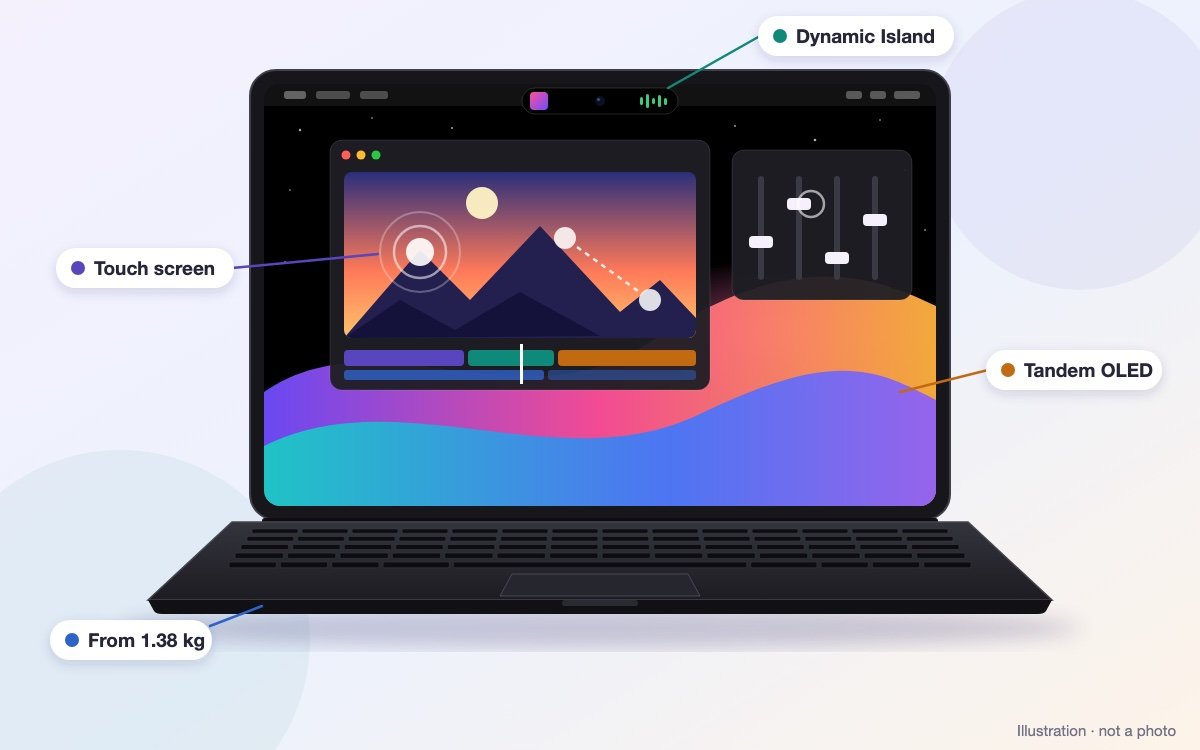
Apple has finally put a touch screen on a Mac. The new MacBook Pro with PROLED XDR Display has an OLED screen you can tap, scroll and pinch, a Dynamic Island in place of the notch, and a lighter body. It starts at £2,899: exactly £400 more than the same MacBook Pro without it. Here is what the £400 buys, what it doesn’t, and who should spend it.
- 14-inch from £2,899
- 16-inch from £3,399
- From 1.38 kg
- Available from 6 November
more than the same MacBook Pro without touch
Same chip, same memorynits at its brightest, for HDR and outdoors
Apple’s figurefor the 14-inch; the 16-inch weighs 1.82 kg
Lightest 14-inch MacBook Profor a charger: none in the box in the UK
Budget for itThe 30-second answer
Buy it if…
you edit photos or video, grade colour, design for print or often work in bright places. The screen is the real upgrade: deeper blacks, Adobe RGB colour and up to 2,000 nits. The lighter 16-inch is a bonus if you carry it.
At Apple · from £2,899 ↗ Student price · from £2,749 ↗Keep the £400 if…
you code, crunch data, run AI models or mostly work at a desk with a monitor. The MacBook Pro without touch has the same M5 Pro chip and the same battery life.
Without touch · from £2,499 ↗Spend far less if…
you mainly write, browse, study and make calls. The new 14-inch with M6 costs £1,999, the outgoing M5 model is still in shops for less, and a MacBook Air is lighter still.
Get: MacBook Pro 14-inch M5 or a MacBook Air M5Three MacBook Pros, one confusing week
Apple launched two different 14-inch MacBook Pros this week, and kept a third on sale. Prices are Apple’s for 1 TB of storage.
| 14-inch with M6 | 14-inch with M5 Pro | PROLED XDR 14-inch with M5 Pro | |
|---|---|---|---|
| Price at Apple | £1,999 with 16 GB · students £1,899 | £2,499 with 24 GB · students £2,349 | £2,899 with 24 GB · students £2,749 |
| Screen | Mini-LED, up to 1,600 nits for HDR | The same Mini-LED | Tandem OLED, up to 2,000 nits for HDR and outdoors, Adobe RGB colour |
| Touch | No | No | Yes, with gestures |
| Top of the screen | Notch | Notch | Dynamic Island |
| Chip | M6: 12-core processor, 12-core graphics | M5 Pro: 15-core processor, 16-core graphics | The same M5 Pro |
| Memory speed | 170 GB/s | 307 GB/s | 307 GB/s |
| Most memory you can order | 32 GB | 64 GB (128 GB with M5 Max) | 64 GB (128 GB with M5 Max) |
| External screens | Two | Three | Three |
| Ports | 3 × Thunderbolt 4, HDMI, SD card, MagSafe, headphones | 3 × Thunderbolt 5, HDMI, SD card, MagSafe, headphones | The same as the M5 Pro |
| Battery (Apple) | Up to 24 h video, 16 h web | Up to 22 h video, 14 h web | Up to 22 h video, 14 h web |
| Weight | 1.55 kg | 1.60 kg | 1.38 kg |
| Charger in the box (UK) | No | No | No |
Why does the newest chip go in the cheapest model? The M6 is Apple’s new everyday chip; the M5 Pro and M5 Max are its workstation chips from March. Don’t let the numbers fool you: the M5 Pro has more processor and graphics cores, reads memory almost twice as fast and runs three external screens instead of two. For heavy work it is the faster chip. For browsing and documents, both are far more than you need.
The 16-inch has no M6 model: £2,999 without touch, £3,399 with the PROLED XDR screen (M5 Pro, 24 GB, 1 TB). The new one drops from 2.14 kg to 1.82 kg.
What’s new
The best screen on any MacBook
Tandem OLED: two layers of light, as on the iPad Pro. Apple quotes 1,000 nits across the whole screen, 2,000 at peak and contrast of 10,000,000:1. Every pixel makes its own light, so a white cursor on black has no glow around it. It covers both P3 and Adobe RGB colour, which matters for print.
Touch, when you want it
Tap, scroll, pinch to zoom, drag clips along a timeline or flick a window to the edge of the screen. A tap works like a click, and small controls grow under your finger. Apple built the touch sensor into the screen and stiffened the hinge. The keyboard and trackpad still do everything, and touch can be switched off in the accessibility settings.
Dynamic Island instead of the notch
The black notch has gone. A pill around the camera shows music, timers and other live updates, and opens Spotlight and Siri. Siri’s new AI features are still in beta. The 12 MP Center Stage camera now also steadies the picture.
Lighter and a little thinner
The 14-inch weighs 1.38 kg, 220 g less than the same chip without touch; the 16-inch weighs 320 g less, at 1.82 kg. Both are slightly thinner: 1.50 cm and 1.60 cm.
The glowing logo is back
The Apple logo on the lid lights up again when the laptop is open, so you can spot the touch model across a room. Apple also promises 50% deeper bass from its six speakers.
What hasn’t changed
The same inside
- The same M5 Pro and M5 Max chips as the MacBook Pro without touch
- The same battery hours from Apple: up to 22 h of video on the 14-inch, 24 h on the 16-inch with M5 Pro
- The same keyboard and trackpad
- The same ports: three Thunderbolt 5, HDMI, SD card, MagSafe and headphones
Only on the touch model
- Storage up to 16 TB with M5 Max (8 TB without touch)
- Tandem OLED with Adobe RGB colour
- Dynamic Island and the glowing logo
- About 220–320 g less to carry
5 things to check before you order
- Budget for a chargerIn the UK the MacBook Pro comes without one. The 14-inch needs at least 70 W: Apple’s costs £59, and its 96 W charger (£79) adds fast charging. The 16-inch needs at least 94 W: Apple’s 96 W is £79, and the 140 W (£99) adds fast charging. A good USB-C charger you already own may do.
- Students pay lessApple’s Education Store sells the 14-inch for £2,749 and the 16-inch for £3,199.
- Matte glass costs £150 moreThe nano-texture option cuts reflections further. The standard glass already has an anti-reflective coating.
- No Apple Pencil, no tablet modeApple has said the Pencil doesn’t work with it, and the screen doesn’t fold back flat. If drawing is the point, an iPad is still the better tool.
- Full reviews come after 6 NovemberSo far there are only short hands-on impressions from the launch. They differ on whether the screen moves when you tap it, and nobody has tested battery life or how the OLED ages yet. Apple says the screen adjusts each pixel for wear.
Who should buy which
Photographers, video editors, print designers
The PROLED XDR 14-inch with M5 Pro. Consider 48 GB for long 4K edits and big photo libraries: John Lewis lists that at £3,699.
A big screen you can carry
The PROLED XDR 16-inch, from £3,399. At 1.82 kg it is 320 g lighter than the 16-inch without touch.
Coders, data and AI work
The M5 Pro without touch, from £2,499. At a desk with a monitor you won’t see the OLED, and for AI models memory matters more than the screen. Which computer for AI? →
Students and everyday work
The 14-inch with M6 at £1,999, or a MacBook Air for much less. MacBook Neo vs MacBook Air →
Our verdict
The PROLED XDR screen is the best Apple has put in a laptop, and for photo, video and colour work it is worth the £400. The lighter 16-inch is the other good reason to buy.
Touch is a nice extra, not a reason to buy on its own. If you code, run AI models or mostly work docked to a monitor, buy the same chip without touch and keep the £400. Either way, add a charger to the price.
Where to buy
Pre-orders are open; Apple lists it as available from Friday 6 November. Prices on 29 October 2026, for the M5 Pro with 24 GB and 1 TB:
Apple
Both sizes, every configuration, and student prices at the Education Store.
14-inch £2,899 · 16-inch £3,399 ↗ Students from £2,749 ↗John Lewis
The same prices as Apple, with the 48 GB versions listed too.
14-inch £2,899 ↗ 16-inch £3,399 ↗The MacBooks in our weekly price check, cheapest first:
Not sure a Mac is right for you? Answer four quick questions →
Quick questions
Does the touchscreen MacBook Pro work with Apple Pencil?
No. Apple has said the Pencil doesn’t work with it. The screen responds to your fingers; a basic stylus works only as a pointer.
Can I turn the touch screen off?
Yes. A setting in Accessibility switches touch off completely, and the keyboard and trackpad keep working as usual.
Does it come with a charger in the UK?
No. Add one when you order, or use a USB-C charger you already have: at least 70 W for the 14-inch and 94 W for the 16-inch.
Is the new MacBook Pro with M6 a touchscreen too?
No. The £1,999 14-inch with M6 keeps the Mini-LED screen and the notch, and has no touch.
Why does the touchscreen model have an older chip?
The M5 Pro and M5 Max are Apple’s workstation chips; the M6 is its new everyday chip. For heavy work the M5 Pro is faster: more cores, faster memory and three external screens instead of two.